


how to fix corrupted sd card/pendrive?
- Feb 9, 2018
- 1 min read

Howdy guys, This post may help to fix corrupted Pendrive and SDcard! So if you are deciding to garbage it then read this post and reuse it.
Firstly go to start ==> search for "cmd" ==> right click and run as administrator as shown in the screenshot.
Then, type diskpart and hit enter.
After that, type list disk and hit enter.
Then type select disk (your pendrive name). Here my pendrive is named disk 1 so I have selected disk 1.
After that type and run clean, then create partition primary, then active then select partition 1 and finally type fs=fat32 and hit enter and your pendrive would fix shortly.
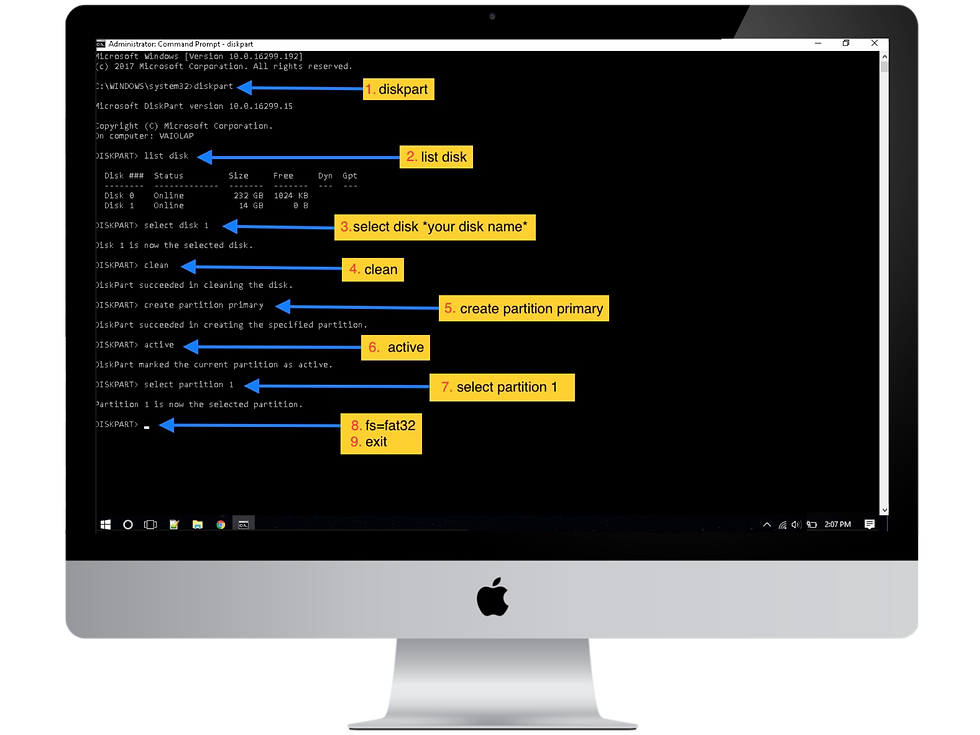
When it's done, type exit and close cmd and try to open your pendrive! It's fixed.. haa?
So guys we hope you loved this post and be sure to share us with your friends and families.
..Peace..
If you have any queries or questions so ask us through Comment section down below.


Comments